


BMI Tracker Pro
0.00.00 Reviews
App Specs
- Version
- 1.0.1
- Updated On
- License
- Free
- Downloads
- 10,000+
- Developer
- Nk Soft
- Categories
- Lifestyle
- Platform
- Android
Screenshots
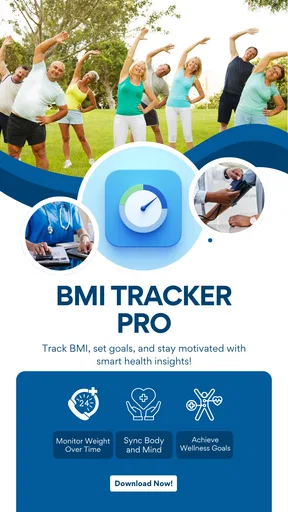
 Analysis by AppCompare
When I want a simple way to make sense of a body-weight trend, I prefer a tracker that keeps the numbers visible without pretending they tell the whole story. BMI Tracker Pro is a lifestyle app from Nk Soft built around recording BMI, setting health goals and viewing progress in charts. It is a focused idea, and that focus is useful: I can imagine opening it after a weigh-in, recording a change and checking whether the longer-term direction matches my intentions.
A focused tracker, not a complete health plan
The app’s appeal is its narrow purpose. Rather than treating BMI as one tile inside a large fitness dashboard, it makes weight-related tracking the main task. That can suit someone who wants a straightforward record and visual reference, especially if broader fitness apps feel crowded or invite constant checking. Its charts can help turn separate entries into a trend that is easier to interpret than a string of remembered numbers.
I would still treat BMI as a rough screening measure, not a diagnosis or a full assessment of health. It does not distinguish muscle from fat or capture every factor that matters to an individual. For that reason, I find a BMI chart most useful as a personal tracking aid over time, not as a verdict on whether someone is healthy. If a result worries you, a qualified health professional is a better person to interpret it.
Where it fits into an everyday routine
A practical routine might be to enter a measurement at a consistent time, such as one morning each week, rather than reacting to every daily fluctuation. I would keep the conditions as similar as possible and focus on the overall direction shown by the chart. This makes the record more meaningful and helps avoid changing a goal because of a small, ordinary variation.
For example, someone beginning a gradual lifestyle change could log a weekly measurement, set a modest target and review the chart at the end of each month. The useful question is not simply whether one entry is higher or lower, but whether the pattern is moving in a way that feels sustainable. If the trend is not what they expected, they can review their routine or discuss it with a clinician instead of treating the app’s number as an instruction.
This approach also answers a common practical concern: how often should I check? The app can hold a record, but it cannot decide what schedule is emotionally or medically right for every user. A steady interval is a sensible starting point for many people; anyone with a history of distress around weight tracking may be better off checking less often, using a different measure, or avoiding weight-focused tools altogether.
Getting Started with BMI Tracker Pro
First things first, downloading BMI Tracker Pro is a breeze. Available on both Android and iOS, it's just a tap away from being part of your daily routine. The installation process is smooth, and before you know it, you're greeted with a clean, user-friendly interface that doesn't overwhelm you with too much info all at once.
Worth Reading Before You Choose

Flipboard Shows What News Apps Must Do Beyond the Feed

Switching to Android Auto Means Rethinking Your Driving Routine

Google Calendar Makes a Crowded Week Easier to Manage

Ludo King Makes the Most of the Minutes Between Plans

Baby Panda World Brings Quick Play to Modern Phones, but Its Game Library Feels Busy

ESPN’s Live Game View Makes Following Close Games Easier
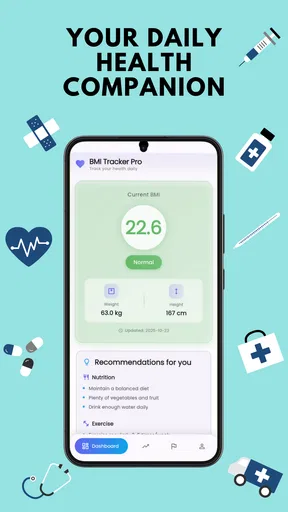
Once you're in, the app prompts you to enter some basic info like your height, weight, age, and gender. This is where things start to get interesting. The app calculates your BMI in a jiffy and provides a clear picture of where you stand in terms of health metrics. It’s like having a personal health assistant without the hefty fee.
Features That Stand Out
Now, let's talk about what sets this app apart from the myriad of fitness apps out there. For starters, the real-time BMI tracker is a game-changer. No need to repeatedly input your data; the app updates your stats as you make changes, offering a dynamic view of your progress.
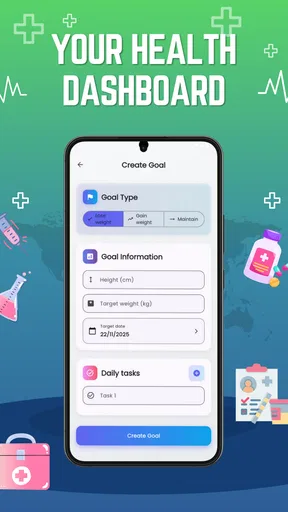
Another feature worth mentioning is the goal-setting function. Whether you're aiming to lose, maintain, or gain weight, the app allows you to set realistic targets. It even sends gentle reminders to keep you on track, which is a nice touch for those of us who tend to procrastinate.
Not to forget, the app has a marvelous charting function. You can view your progress over days, weeks, or months. It's like having a visual diary of your fitness journey. The charts are straightforward and easy to interpret, making it simple to spot trends or areas that need more attention.
In practice, I would use the chart as a prompt to reflect, not as proof that a particular habit caused a change. Weight can shift for many ordinary reasons, and a chart cannot explain why. One helpful habit is to add a brief note outside the app, if that suits your routine, about relevant context such as a change in exercise or travel. That can make later reviews less prone to guesswork, without turning tracking into a daily audit.
Usability and Design
The design of BMI Tracker Pro is sleek and modern. The app uses a soothing color palette, making it easy on the eyes. Navigation is intuitive, with everything you need just a couple of taps away. Even if you’re not the most tech-savvy person, you’ll find it easy to get around.
Moreover, the app is quite responsive. There's no lag or delay, which is crucial when you want to quickly check your stats. The developers have clearly invested time and effort into ensuring a seamless user experience.
The low-friction format matters most when you are building a habit. If recording a measurement takes only a moment, it is easier to maintain a consistent log than it is with a sprawling wellness platform full of unrelated screens. On the other hand, a simple tracker may feel limited if you want to combine food logging, workouts, sleep records and detailed health reports in one place. In that case, a full-featured health or fitness app may be a better home base, with a dedicated BMI tool serving only as a companion.
Customization and Personalization
One of the aspects I love about this app is its level of customization. You can tailor notifications to suit your preferences, adjust privacy settings, and even choose between metric and imperial units. The app respects your personal space while ensuring you have the right tools to reach your goals.
Additionally, BMI Tracker Pro provides personalized tips based on your progress. It’s like having a pocket coach giving you nudges in the right direction. These tips are practical and easy to implement, which can be a huge motivator.
Reminders are most helpful when they support a plan you have already chosen. I would set them for a time that fits my routine and turn them down or off if they start to feel like pressure. A notification can bring a task back to mind, but it cannot know whether a goal is appropriate or whether a particular day is a good time to focus on weight. Keeping that distinction clear makes the app easier to use without letting alerts dictate your mood.
Integration and Compatibility
In today’s digital age, compatibility with other apps and devices is crucial. BMI Tracker Pro doesn’t disappoint here. It easily syncs with popular health apps and wearable devices, ensuring all your health data is in one place. Whether you're using a fitness band or a smartwatch, integration is seamless, which means no more juggling between multiple apps.
For someone deciding between this and a manual spreadsheet, the main trade-off is convenience versus flexibility. A spreadsheet can be adapted to record context, measurements and notes in exactly the way its owner prefers, but it takes more setup and maintenance. A dedicated tracker is more approachable for routine BMI entries and chart viewing. If a person’s priority is a broad activity picture from a wearable, the wearable’s own health platform may be more useful; if the priority is a clear BMI-focused record, this app’s narrower purpose is the point.
Before relying on any health app as a long-term record, I would also check how it behaves on the device I plan to use and make sure I understand any available privacy controls. Personal measurements are sensitive, so it is worth choosing deliberately what to enter and which reminders to enable. I would not assume a BMI tracker can replace a clinician’s record or provide medical monitoring; its role is personal organization and reflection.
Who will get the most from it
I think this is most suitable for adults who want an uncomplicated way to log BMI, work toward a self-chosen goal and look at progress visually. It may also suit someone restarting a routine after a break: an existing chart can make it easier to resume regular entries without needing to build a complicated tracking system first. The age rating is Everyone, but that does not mean weight tracking is appropriate for every person or every age. Parents should use their judgment, and children’s growth and weight should be discussed with a healthcare professional rather than managed through adult-oriented targets.
I would suggest skipping a BMI-centered app if tracking numbers tends to trigger anxiety, compulsive checking or unhealthy restriction. It is also not the right tool for anyone looking for diagnosis, treatment guidance, body-composition analysis or a complete exercise and nutrition program. In those situations, a clinician or a broader, carefully chosen service is a better fit. Even users who enjoy tracking should remember that a goal can be adjusted or abandoned if it stops supporting their well-being.
Cost, version and what to keep in mind
BMI Tracker Pro is free to download and is rated for Everyone. It has over ten thousand installs and is at version 1.0.1, following its release on October 23, 2025. The listed in-app purchases range from $0.19 to $30.00 per item, so I would check the purchase details in the app before paying for anything and decide whether an optional purchase is genuinely useful to my routine. The app requires Android 5.0 or later on Android devices.
Because this is an early version, I would approach it as a focused tool whose current job is to make BMI tracking and goal review accessible, rather than assuming it will replace a mature health platform. The version number tells me where the product stands now; it does not prove what Nk Soft will add next. For an existing user, the practical test is whether the current tracking flow remains dependable and whether any future changes make the chart and goal routine more useful without adding clutter.
What I would watch over time is not a promise of new features, but the basics that determine whether a tracker earns a place in daily life: stable entries, clear charts, sensible controls for reminders and a transparent purchase experience. If the app continues to make those tasks easy, it can be enough for a simple personal log. If a user needs deeper analysis or a connected record shared with a care team, they should compare options based on those specific needs rather than waiting for this app to become something it is not today.
Final Thoughts
So, is BMI Tracker Pro worth the download? In my opinion, absolutely. It’s packed with features that cater to both beginners and fitness enthusiasts. The app is user-friendly, visually appealing, and incredibly functional. If you're serious about tracking your fitness journey, this app is a fantastic companion.
With its thoughtful design and practical features, BMI Tracker Pro makes staying on top of your health metrics not just easy, but enjoyable. Whether you're just starting out or you're a seasoned pro, this app has something to offer everyone. Give it a try, and you might just find it’s the missing piece in your fitness puzzle.
Pros
- User-friendly interface for quick navigation.
- Accurate calculations with detailed metrics.
- Syncs seamlessly with health apps.
- Tracks progress with visual charts.
- Custom reminders for health goals.
Cons
- Limited features in free version.
- Ads can be intrusive at times.
- Requires internet for full functionality.
- Data export options are limited.
- No support for wearable devices.
FAQs for BMI Tracker Pro
What features does BMI Tracker Pro offer to users?
BMI Tracker Pro provides a comprehensive suite of features designed to help users monitor their health. These include calculating Body Mass Index (BMI) based on height and weight, tracking body measurements, setting personal fitness goals, and generating progress reports. The app also offers integration with other health apps and wearable devices for a seamless experience.
Is BMI Tracker Pro easy to use for beginners?
Yes, BMI Tracker Pro is designed with user-friendliness in mind. The app offers an intuitive interface with clear instructions and easy navigation. Beginners will find the setup process straightforward, as the app guides users through inputting their personal data and understanding the resulting analysis. Additionally, the app includes helpful tips and FAQs to assist new users.
How accurate is the BMI calculation in the app?
The BMI calculations provided by BMI Tracker Pro are based on standard formulas used by health professionals worldwide. However, users should remember that BMI is a general indicator and might not fully represent individual health status. For personalized health assessments, it is recommended to consult with a healthcare professional in conjunction with using the app.
Does BMI Tracker Pro require an internet connection to function?
BMI Tracker Pro primarily functions offline, allowing users to input data and track progress without an internet connection. However, for features like data synchronization with cloud storage, updates, and integration with other apps, an internet connection is necessary. This flexibility ensures that users can access their data anytime, anywhere.
Is my personal data safe with BMI Tracker Pro?
Yes, BMI Tracker Pro prioritizes user privacy and data security. The app employs robust encryption protocols to safeguard personal information. Users have control over their data with options to manage privacy settings and choose what information to sync with cloud services. Regular security updates ensure ongoing protection against potential threats.


